
AI assistants (MCP)
Prism runs an MCP server, so an AI assistant can search your projects, read components, nets and BOMs at a revision, compare revisions, render views, leave review comments and add parts to the component catalog. It acts as you, with your role and folder visibility, and it can’t sign anything off.
Turn on the MCP server
Section titled “Turn on the MCP server”The MCP server is off by default. An administrator turns it on:
- Set
PRISM_MCP_ENABLED=true. - Set
PUBLIC_BASE_URLto the address people use to reach Prism, for examplehttps://prism.example.com. Sign-in tokens are bound to<PUBLIC_BASE_URL>/mcp, so it must match what clients connect to. - Restart the backend.
Both settings are described in Configuration. While the server is off, /mcp and its sign-in metadata answer 404.
Connect Claude Code
Section titled “Connect Claude Code”-
Add the server:
Terminal window claude mcp add --transport http prism https://prism.example.com/mcp -
Start Claude Code and ask it something about a project, for example “List the Prism projects”. The first call opens Prism in your browser.
-
Sign in if asked, check the access the client asks for, and approve it.
The client is now connected and appears under Settings → Connected MCP clients.
Here Claude Code compares two releases of an open hardware board through Prism, and summarises what changed:
Connect other clients
Section titled “Connect other clients”The server address is https://<your Prism>/mcp. It speaks MCP over Streamable HTTP and signs clients in with MCP OAuth, so a client that supports OAuth finds the sign-in page on its own.
-
Claude Desktop and claude.ai: add a custom connector with the server address.
-
A client without OAuth: send a personal access token as the header
Authorization: Bearer prism_pat_.... In Claude Code:Terminal window claude mcp add --transport http prism https://prism.example.com/mcp --header "Authorization: Bearer prism_pat_..."
A browser session cookie isn’t accepted at /mcp.
Approve access
Section titled “Approve access”A client signed in with OAuth starts with read access (api:read) only. The first time the assistant tries a write, Prism asks your client for just the scope that write needs, and you approve it in the browser. The scopes a client can be granted are api:read, comments:write, design:write and catalog:write, plus ops:read and ops:act for administrators when ops diagnostics are on.
A client using a personal access token isn’t asked. A write its token can’t make fails with the code insufficient-scope, naming the scope it lacks.
Read tools
Section titled “Read tools”These tools change nothing in Prism.
| Tool | Returns |
|---|---|
render_view |
a PNG of a schematic sheet, a PCB layer set (front, back, copper or all) or a 3D view (top or bottom) at a revision, with chosen components or nets highlighted, optionally cropped to a region in mm. 3D views have no highlights. A render still running returns its status; ask again with the same arguments. |
search_projects |
projects matching a name, description or repository |
get_project |
one project’s record and latest sync |
list_revisions |
a project’s commits, newest first |
find_in_design |
components and nets at a revision matching a reference, value, field or name |
get_component |
one component at a revision: value, footprint, sheet, assembly state, fields, and pins with their nets |
get_net |
one net at a revision: pins, connected components, class and aliases |
get_bom |
the engineering BOM at a revision, grouped as the UI groups it, all lines or assembly only |
get_comparison_review |
the review groups of a finished comparison for the schematic or the PCB |
get_job |
a job’s status, stage and message |
list_comments |
a project’s comment threads, optionally only open or resolved ones |
search_catalog |
catalog components matching a part number, manufacturer or description |
get_catalog_component |
one catalog component with its assets, workflow stage and release state |
list_catalog_fields |
the catalog’s metadata fields, including custom ones |
search_catalog_assets |
symbols, footprints and 3D models the catalog already stores |
check_catalog_asset |
whether KiCad can read a draft symbol or footprint, its KLC findings and a PNG of each unit, without storing anything. It needs catalog:write. |
get_release_status |
a project’s Release Studio candidates and their builds |
compare_revisions |
starts a comparison of two commits, branches or tags and returns its job id; it changes no design |
get_changes |
the review rows of a finished comparison, filtered by kind (added, changed, removed), impact or reference, one page at a time |
To review a change, an assistant calls compare_revisions, polls get_job until the job is completed, then reads get_changes. A client that supports the MCP tasks extension gets a task for compare_revisions instead, and follows it with tasks/get.
Write tools
Section titled “Write tools”| Tool | Does | Scope |
|---|---|---|
sync_project |
queues a sync of the project with its remote; returns a job id | design:write |
start_release_build |
queues a Release Studio candidate build for one commit; returns a job id. It never approves or publishes. | design:write |
request_release_approval |
changes nothing: returns the project’s Release Studio page, where a person approves | design:write |
create_catalog_draft |
creates an unreviewed catalog component in the open workflow stage | catalog:write |
update_import_proposal |
saves draft edits to a catalog import session’s proposals; it doesn’t accept, reject or release anything | catalog:write |
update_catalog_component |
fills in or corrects a component’s metadata | catalog:write |
create_asset_upload |
returns a one-time URL to PUT a file too large to send inline, such as a STEP model |
catalog:write |
attach_catalog_asset |
attaches a symbol, footprint, 3D model or SPICE model, inline or from an upload | catalog:write |
reuse_catalog_asset |
gives a component an asset the catalog already stores, shared rather than copied | catalog:write |
validate_catalog_component |
runs KLC validation and returns the findings | catalog:write |
update_catalog_representation |
points a representation (a symbol and footprint pair) at other assets, renames it or makes it the default | catalog:write |
remove_catalog_representation |
removes a representation and detaches its assets when nothing else uses them | catalog:write |
move_catalog_component |
moves a component to In progress or QA Review, never further | catalog:write |
request_catalog_approval |
changes nothing: returns the component’s page, where a QA reviewer approves it | catalog:write |
add_comment |
comments on a component, a net, a schematic sheet or one comparison change, with an optional class and severity. Prism places the comment from the design at that revision, not from coordinates. | comments:write |
reply_to_comment |
replies in an existing thread | comments:write |
resolve_comment |
changes nothing: returns the Prism page where you resolve the thread yourself | comments:write |
resolve_comment, request_release_approval and request_catalog_approval hand the step back to you as a link. Your client opens it, and you act in Prism.
Add a part to the catalog
Section titled “Add a part to the catalog”With the catalog tools an assistant can take a new part from an empty record to QA Review: create it, fill its fields, check and attach a symbol and footprint (or reuse a stored footprint), attach a STEP model, validate, and move it to QA Review. Prism doesn’t make the files. The assistant brings them, and Prism checks and stores them. Prism embeds an attached 3D model in the footprint it serves.
A corrected file attached later adds a representation. The assistant then replaces the old one with update_catalog_representation and remove_catalog_representation. Approving the part stays with a QA reviewer.
Every write tool takes an optional idempotencyKey. A client that retries a write with the same key gets the first result back, not a second comment.
What results contain
Section titled “What results contain”- Each design result names the full commit it read. Pass that commit as
revisionto keep later calls on the same design. - Results cite a Prism link that opens the viewer on exactly that component or net (see Links to a view) and a
prism://resource URI. - The server also offers components, nets and BOMs as resources, at
prism://project/{project_id}/rev/{commit}/component/{key},.../net/{key}and.../bom. - Every result is marked as untrusted data. Comment text, field values and file contents are returned as data, and no tool acts on instructions found inside them.
Comments and replies an assistant writes through OAuth carry an Agent badge in Prism. Hover it to see the client’s name.
Control what assistants reach
Section titled “Control what assistants reach”Administrators configure MCP under Settings → MCP:
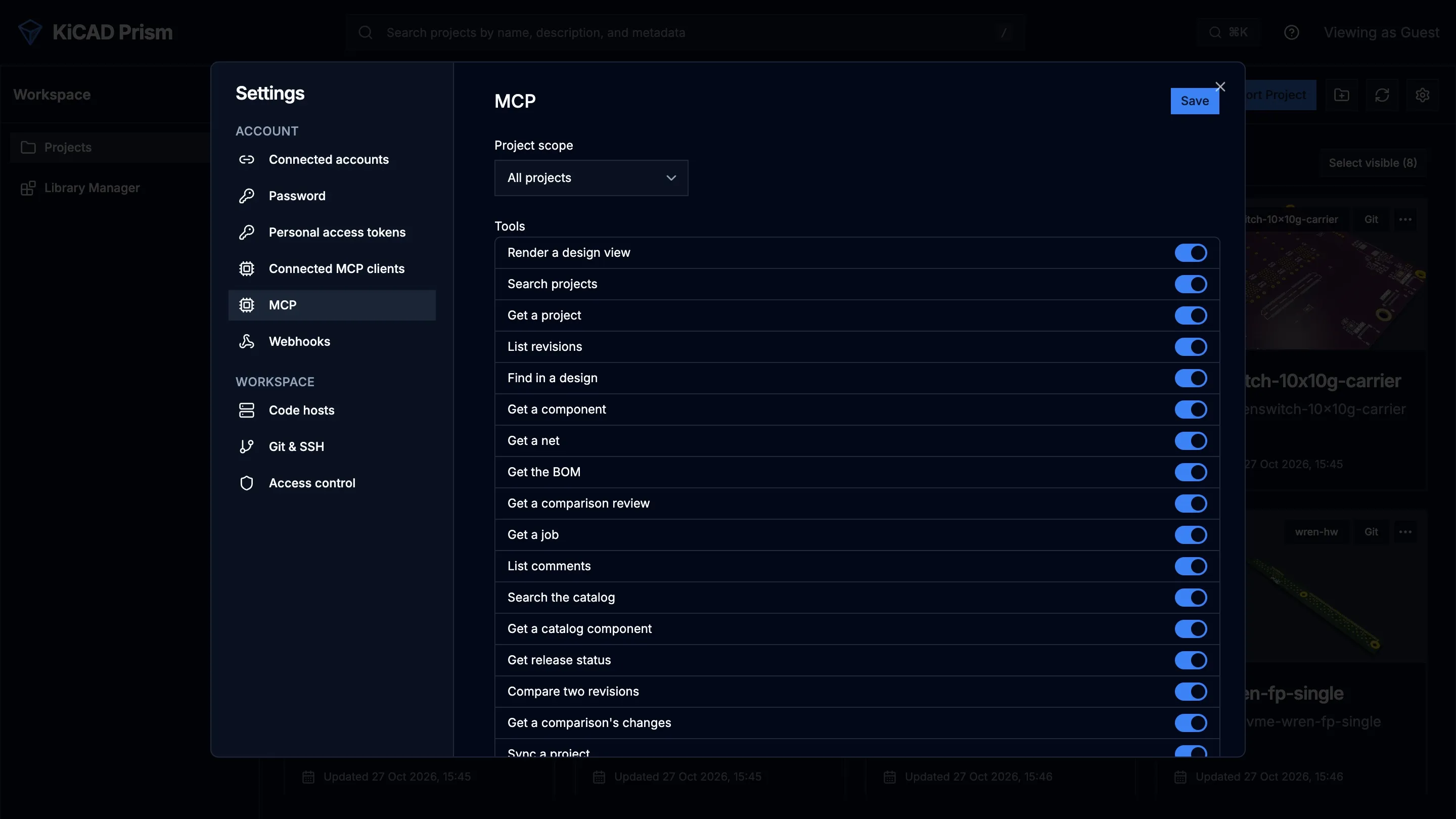
- Project scope: All projects (each person still sees only what their role and folder visibility allow) or Listed projects. A project outside the list looks to an assistant exactly like one that doesn’t exist.
- Tools: switch any tool off. A disabled tool disappears from the assistant’s tool list.
- Audit: every MCP tool call and resource read is recorded with the time, user, client, token, tool, project, revision and outcome, and so is every write made through the HTTP API with a token. Filter by client, token, project, tool, or reads and writes. How long rows are kept is set in Configuration.
Each person sees their connected clients, with the scopes granted and last use, under Settings → Connected MCP clients, and clicks Revoke to disconnect one. That page shows only your own clients. An administrator lists everyone’s with GET /api/v1/auth/mcp-clients/all and can revoke any of them with DELETE /api/v1/auth/mcp-clients/{grant_id}.