
API and tokens
Create a personal access token, then call any Prism route under /api/v1 from any language. Everything the web app does goes through this API.
Create a personal access token
Section titled “Create a personal access token”- Sign in to Prism in the browser.
- Open Settings → Personal access tokens.
- Enter a Token name (1 to 80 characters).
- Tick the scopes the script needs. See Scopes.
- Set Expiry (days). The administrator sets the longest allowed expiry.
- Click Create.
- Copy the token with Copy token. It starts with
prism_pat_and is shown only once.
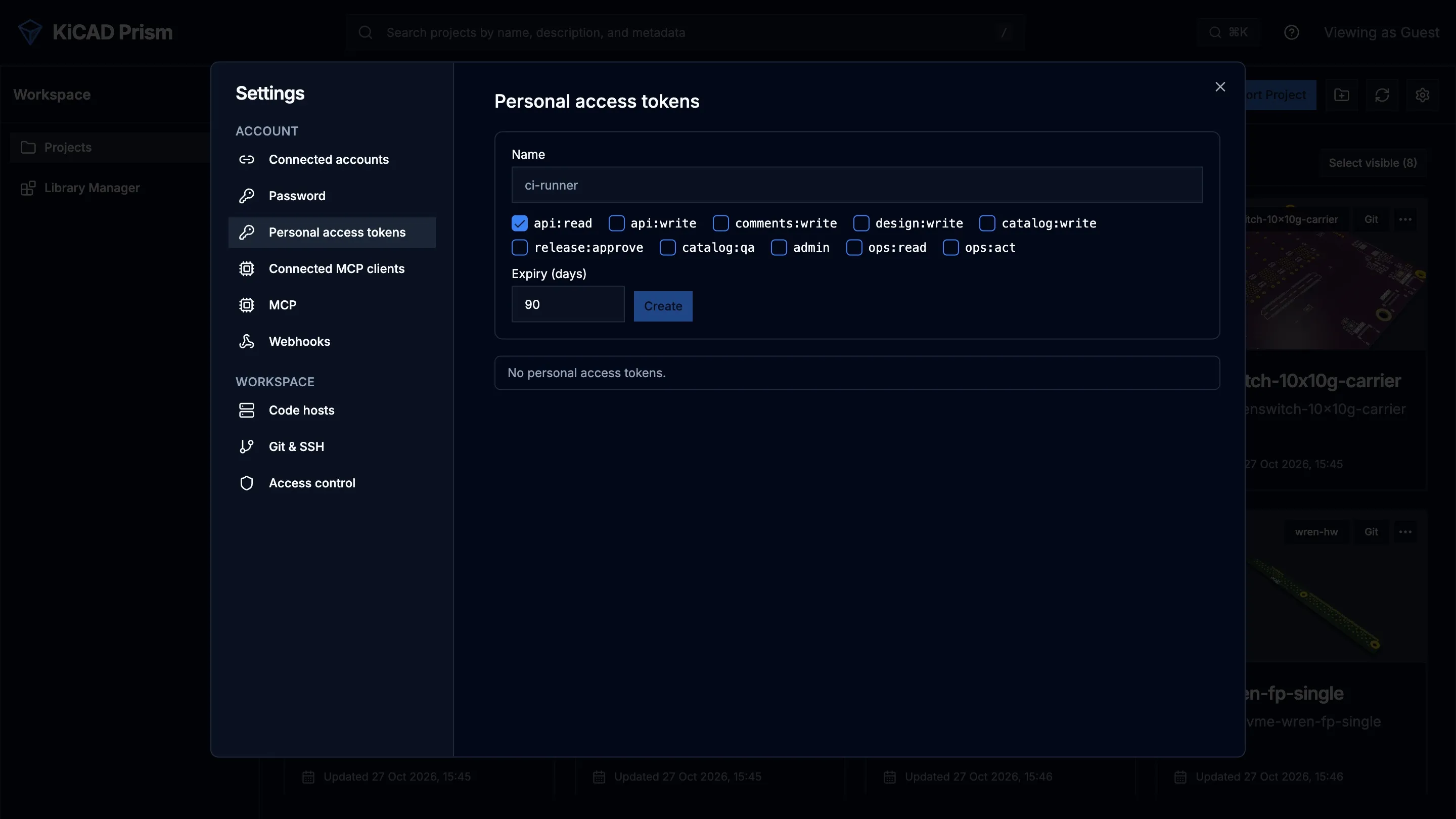
A token can only be created from a signed-in browser session; a token can’t create another token. Tokens aren’t available while authentication is off.
The list under the form shows each of your tokens with its name, prefix, scopes, expiry and last use. Click Revoke on a row to stop the token at once. The page shows only your own tokens. An administrator lists everyone’s with GET /api/v1/auth/tokens/all and can revoke any of them with DELETE /api/v1/auth/tokens/{token_id}.
Scopes
Section titled “Scopes”A token’s scopes limit what it may do. Its owner’s role limits it further: a token never does more than its owner could do in the browser right now.
| Scope | Allows |
|---|---|
api:read |
every read the owner can make |
comments:write |
add comments and replies |
design:write |
project and design changes that need the designer role, such as syncing a project or queuing a release build |
catalog:write |
catalog edits, such as creating a component draft |
release:approve |
approving and publishing releases |
catalog:qa |
catalog QA decisions |
admin |
administrator changes |
api:write |
every scope from comments:write to admin above |
ops:read |
the ops diagnostics reads |
ops:act |
the ops actions, and everything ops:read allows |
Every write scope also grants api:read. api:write never grants ops:read or ops:act. Only an administrator can create a token with an ops scope.
No token resolves or reopens a comment thread, whatever its scopes.
Call the API
Section titled “Call the API”- The base path is
/api/v1. The unversioned/apipaths still work, but use/api/v1in new scripts. - The OpenAPI document is at
/api/v1/openapi.json. Every operation has a stableoperationIdand a typed response. - Send the token as
Authorization: Bearer <token>. - An error is a JSON object
{"detail": "...", "code": "..."}.
curl -H "Authorization: Bearer $PRISM_TOKEN" "https://prism.example.com/api/v1/projects/search?q=power"Retry a write safely
Section titled “Retry a write safely”Send an Idempotency-Key header on a POST, PUT, PATCH or DELETE. Use a fresh value, such as a UUID, for each new write, and the same value when you retry it.
- Repeating the request with the same key within 24 hours returns the first response, with the header
Idempotent-Replayed: true. The work isn’t done twice. - Reusing a key on the same route with a different query or body is refused with the code
idempotency-key-reused. - A retry that arrives while the first request is still running gets a conflict with the code
idempotency-key-in-progress. Wait and retry. - A key is 1 to 255 printable ASCII characters.
- A response with a 5xx status isn’t stored, so a retry runs the request again.
curl -X POST \ -H "Authorization: Bearer $PRISM_TOKEN" \ -H "Idempotency-Key: 7f9c2e64-5d1b-4f0e-9a51-3c6b2f1d8e40" \ https://prism.example.com/api/v1/projects/my-board/syncThe Python SDK adds a fresh key to every write for you.
Pin a revision
Section titled “Pin a revision”Design reads take a revision, so a script reads one commit even while the branch moves:
| Read | Route | Parameter |
|---|---|---|
| Search components and nets | GET /api/v1/projects/{project_id}/design/search |
revision |
| One component | GET /api/v1/projects/{project_id}/design/components/{ref} |
revision |
| One net | GET /api/v1/projects/{project_id}/design/nets/{name} |
revision |
| Engineering BOM | GET /api/v1/projects/{project_id}/bom |
commit |
The value is a commit, branch or tag. Left out, Prism reads the project’s current head. The response names the full commit it read, so later calls can pin to it.
Follow long work
Section titled “Follow long work”Comparisons, project syncs, design-data builds, release builds and imports run as jobs. The route that starts one returns a job id.
- Start the work and keep the
job_idfrom the response. - Poll
GET /api/v1/jobs/{job_id}every few seconds. - Stop when
statusiscompleted,failedorcancelled.
Read the event log
Section titled “Read the event log”GET /api/v1/events?after=<cursor> lists what happened, oldest first: project syncs, design-data builds, job progress, finished comparisons, comment changes and release candidates. Each event has an id, a kind, a topic, a projectId, a createdAt time and a payload.
| Parameter | Meaning |
|---|---|
after |
return events after this id; start at 0 |
topic |
only these topics; repeat it for several. Most events use project:<project id>; a finished comparison uses job:<job id>. |
limit |
events per page, up to 500 |
The response is {"events": [...], "next": <cursor>}. Pass next as after on the next call. You only see events for projects you can see.
The WebSocket /api/v1/events/live pushes the same events as they happen. After connecting, send a subscribe frame:
{"type": "subscribe", "after": 0, "topics": ["project:my-board"]}Prism answers with {"type": "events", "events": [...], "next": <cursor>} frames. Keep the last next and send it as after when you reconnect.
Events are kept for a limited time, set by the administrator. See Configuration. To have Prism push events to your service instead, use Webhooks.
Request ids
Section titled “Request ids”Every response carries an X-Request-Id header. You may send your own: 1 to 64 letters, digits, ., _ or -. Quote it when you report a problem; an administrator can trace it with the ops diagnostics.
Every write made with a token is recorded with the user, token and route. Administrators see these rows under Settings → MCP, in Audit.