
Sign-in and access
This page sets up how people sign in to Prism and what each of them may do. The settings themselves are listed under Authentication.
Prism offers two sign-in methods for people, OIDC and local passwords. You can turn on either or both. KiCad, scripts and AI assistants use tokens instead, described at the end of this page.
Set up OIDC sign-in
Section titled “Set up OIDC sign-in”-
Register a confidential client for Prism with your identity provider, with these two redirect URIs:
https://prism.example.com/auth/callbackhttps://prism.example.com/oauth/oidc/callbackThe first is for the browser. The second is for KiCad’s remote symbol panel. Replace the host with your
PUBLIC_BASE_URL.localhostand127.0.0.1count as different addresses, so register the one you actually use. -
Set the client in the environment file:
AUTH_ENABLED=trueOIDC_ISSUER_URL=https://sso.example.com/realms/engineeringOIDC_CLIENT_ID=kicad-prismOIDC_CLIENT_SECRET=<client secret>OIDC_PROVIDER_NAME=Company SSOSESSION_SECRET=<random value, at least 32 characters>BOOTSTRAP_ADMIN_USERS_STR=admin@example.comPUBLIC_BASE_URL=https://prism.example.comCORS_ORIGINS_STR=https://prism.example.com -
Recreate the containers:
Terminal window docker compose up -d -
Sign in with a bootstrap administrator’s account.
The issuer must use https:// and publish standard OIDC discovery metadata.
Prism uses the authorization code flow with PKCE. If your provider needs the
client secret in a Basic header, set OIDC_TOKEN_AUTH_METHOD=client_secret_basic.
If it names the email or display name claim differently, set
OIDC_EMAIL_CLAIM or OIDC_NAME_CLAIM.
Set up password sign-in
Section titled “Set up password sign-in”Password sign-in needs no identity provider. It never creates an account: a person can sign in only once an administrator has given their email a role, and there is no public sign-up.
-
Turn it on and seed the first administrator:
AUTH_ENABLED=truePASSWORD_AUTH_ENABLED=trueSESSION_SECRET=<random value, at least 32 characters>BOOTSTRAP_ADMIN_USERS_STR=admin@example.comBOOTSTRAP_ADMIN_PASSWORD=<one-time password, at least 12 characters> -
Recreate the containers.
-
Sign in as the administrator. Prism asks you to choose a new password.
-
Remove
BOOTSTRAP_ADMIN_PASSWORDfrom the environment file and recreate the containers again.
Prism does not overwrite a password that has already been set, so leaving the seed in place does not reset anything, but it leaves a secret lying around.
People change their own password under Settings → Password. Prism sends no email, so a forgotten password is reset by an administrator: open Settings → Access control, open the row’s menu and choose Reset password. The account must change that password at its next sign-in.
Check the configuration at startup
Section titled “Check the configuration at startup”With sign-in on, Prism refuses to start rather than run half-configured. The
log names the reason, for example a missing SESSION_SECRET or an incomplete
OIDC client. The full list is under
Startup checks.
Assign roles
Section titled “Assign roles”Each person has exactly one role.
| Role | Projects | Comments | Library Manager | Releases |
|---|---|---|---|---|
viewer |
Open and review | Write, edit their own | Browse | Inspect |
qa |
Open and review | Write, edit their own | Browse; QA review | QA sign-off |
designer |
Import, sync, organise, run workflows | Write; resolve and publish threads | Create and edit parts | Start builds; designer sign-off |
admin |
Everything | Everything, including others’ comments | Everything | Everything |
Roles do not combine. A designer cannot give the QA sign-off, so independent
release review needs a separate qa account.
To give someone a role:
- Open Settings → Access control.
- Enter their email, pick the role and click Add.
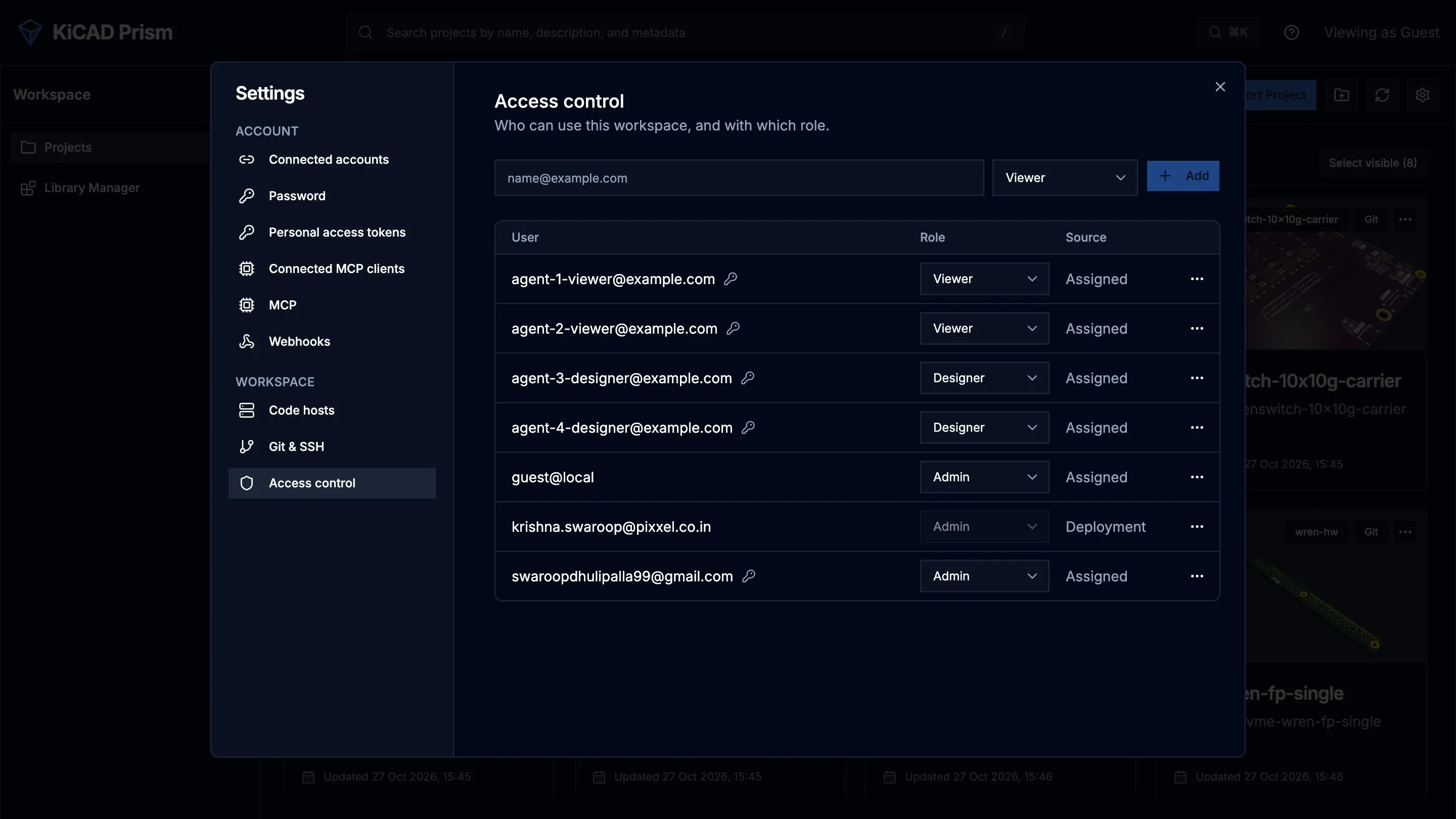
Removing someone’s role ends all their sessions.
Three settings decide who may sign in before any role is checked:
BOOTSTRAP_ADMIN_USERS_STRnames emails that are alwaysadmin. Use it for the first administrators only, and manage everyone else in Prism. Bootstrap rows cannot be removed in the UI.DEFAULT_VIEWER_DOMAINS_STRgivesviewerto anyone from the listed email domains who has no role yet. Leave it empty if every person must be approved.ALLOWED_USERS_STRandALLOWED_DOMAINS_STRrefuse everyone not on the list, whatever their role.
Keep at least two administrators.
Sessions
Section titled “Sessions”Prism keeps sessions in PostgreSQL and sends the browser an opaque, signed,
HttpOnly cookie. A session lasts SESSION_TTL_HOURS, or
SESSION_REMEMBER_ME_DAYS when the person ticks Remember me on this device
at password sign-in. Set
SESSION_IDLE_TIMEOUT_MINUTES to end idle sessions sooner.
Changing SESSION_SECRET signs everyone out and invalidates KiCad’s provider
tokens.
Guest mode
Section titled “Guest mode”AUTH_ENABLED=falseDEV_GUEST_ROLE=viewerGuest mode removes sign-in and treats every request as a guest with
DEV_GUEST_ROLE. Use it only for a private trial on one machine or a
deliberately public read-only demo. Prism logs a warning at every start, and
refuses to start in guest mode when PUBLIC_BASE_URL is https://, or when it
names another host and the guest role is admin.
A single person evaluating Release Studio on their own machine needs
DEV_GUEST_ROLE=admin, because a designer cannot give the QA sign-off.
DEV_MODE does not turn sign-in off.
Tokens for KiCad, scripts and assistants
Section titled “Tokens for KiCad, scripts and assistants”| Caller | How it signs in | What it can do |
|---|---|---|
| KiCad’s remote symbol panel | Through the browser, against the same Prism sign-in | Read released parts only. Refused everywhere else. |
| Scripts and CI | A personal access token from Settings → Personal access tokens | At most what its owner’s role allows, limited to the scopes chosen when it was made. |
| AI assistants over MCP | Through the browser, as the person using them | Their user’s access, minus release approval, Library QA and administration. Off until you set PRISM_MCP_ENABLED=true. |
| Integrations | A service client created through the API by an administrator | The scopes the administrator gave it. |
| Your identity provider’s own tokens | OAUTH_EXTERNAL_JWT_* settings |
The role and scopes in the token’s claims. The audience check cannot be turned off. |
A token never holds more than its owner’s current role. Personal access tokens
expire after 90 days by default, and never later than PRISM_PAT_MAX_DAYS.
People see and revoke the assistants they connected under
Settings → Connected MCP clients.
How to create and use each kind is in API and tokens and MCP.
Review access regularly
Section titled “Review access regularly”At least every quarter:
- Review the bootstrap administrators and the role list.
- Remove people who have left.
- Revoke unused service clients and tokens.
- Check the OIDC redirect URIs, the allowed origins and whether password sign-in should still be on.
- Confirm guest mode is off.
- Confirm the API port is not reachable directly from the network.
- Sign in as a
viewerand check what it can see.